📌 Key Takeaways
- Technical SEO creates the foundation — without it, even excellent content won't rank
- Core Web Vitals (LCP, INP, CLS) are confirmed Google ranking signals in 2026
- Crawl budget matters most for large sites — Google won't index what it can't crawl
- HTTPS is a baseline requirement; sites without it face ranking penalties
- Structured data (schema markup) helps Google understand your content and earns rich results
Table of Contents
1. Crawlability & Indexing
Before Google can rank your pages, it needs to find and index them. Crawlability problems are surprisingly common — and they silently prevent your content from ever appearing in search results, no matter how good it is.
The crawling process works in three stages: discovery (Googlebot finds URLs), crawling (it visits and reads each page), and indexing (content is stored and eligible to rank). Problems at any stage mean your page won't rank.
robots.txt — What to Check
Your robots.txt file tells search engines which pages they are and aren't allowed to crawl. A misconfigured robots.txt is one of the most common — and most damaging — technical SEO mistakes. A single line like Disallow: / can block your entire site from Google.
Always verify your robots.txt is not accidentally blocking important pages. Use Google Search Console's robots.txt tester to check. Your file should allow crawling of all pages you want indexed, and only block admin areas, duplicate parameter URLs, and private content.
XML Sitemap
A well-maintained XML sitemap acts as a roadmap for search engines. It tells Google which pages exist, when they were last updated, and how important they are relative to each other. Submit your sitemap in Google Search Console under the Sitemaps report.
Keep your sitemap clean: only include pages you want indexed, update lastmod dates when content changes, and remove deleted pages promptly. Sitemaps with hundreds of 404 errors or redirect chains damage your crawl efficiency.
Crawl Budget
Google allocates a crawl budget to every site — a limit on how many pages it will crawl in a given period. For small sites (under 1,000 pages), this rarely causes problems. For larger sites, poor crawl budget management means important pages get crawled infrequently or not at all.
Conserve crawl budget by eliminating low-value pages, fixing redirect chains, removing URL parameters that create duplicate pages, and consolidating thin content.
2. Site Speed & Core Web Vitals
Page speed has been a ranking factor since 2010, as confirmed in Google's original announcement for desktop and 2018 for mobile. In 2021, Google introduced Core Web Vitals as a formalised set of speed and user experience metrics. In 2026, these remain critical ranking signals.
The Three Core Web Vitals
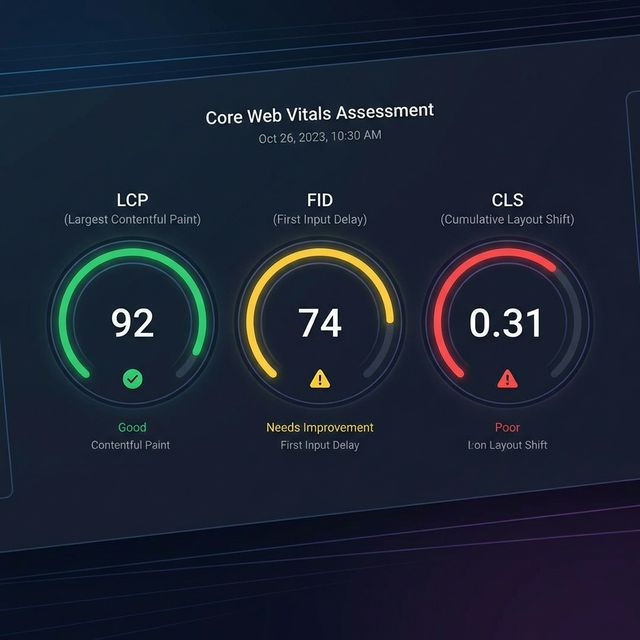
Largest Contentful Paint (LCP) measures how quickly the main content of a page loads. Google's target is under 2.5 seconds, per the web.dev LCP documentation. Poor LCP is most often caused by slow server response times, render-blocking resources, or unoptimised images. Fix it by upgrading hosting, compressing images to WebP format, and deferring non-critical JavaScript.
Interaction to Next Paint (INP) replaced First Input Delay (FID) in March 2024. It measures the responsiveness of a page to all user interactions throughout their visit. Google's target is under 200 milliseconds. Excessive JavaScript execution is the primary cause of poor INP — audit and reduce your JS payload.
Cumulative Layout Shift (CLS) measures visual stability — how much the page layout unexpectedly shifts as it loads. Google's target is under 0.1. Always specify width and height attributes on images and embeds, and avoid injecting content above existing page content after load.
Practical Speed Improvements
Beyond Core Web Vitals, general speed improvements compound over time. Enable browser caching so returning visitors load pages faster. Use a Content Delivery Network (CDN) to serve assets from servers closer to your users. Minify HTML, CSS, and JavaScript to reduce file sizes. Implement lazy loading for images below the fold so they only load when needed.
Use Google's PageSpeed Insights and Search Console's Core Web Vitals report to monitor your scores. Aim for "Good" status (green) on all three metrics for both mobile and desktop.
3. Mobile Optimisation
Google uses mobile-first indexing for all websites — meaning it primarily uses the mobile version of your content for indexing and ranking. If your mobile experience is poor, your rankings will suffer regardless of how good the desktop version looks.
Use a responsive design that adapts to any screen size. Ensure text is readable without zooming (minimum 16px font size). Make sure tap targets (buttons, links) are large enough to tap without accidentally hitting adjacent elements — Google recommends at least 48x48 pixels. Avoid horizontal scrolling and content wider than the viewport.
Test your mobile experience using Google's Mobile-Friendly Test tool. Also check Search Console's Mobile Usability report for any issues Google has detected on your specific pages.
4. HTTPS & Security
HTTPS has been a Google ranking signal since 2014. In 2026, it is a non-negotiable baseline — Chrome marks HTTP sites as "Not Secure," and users are unlikely to trust or engage with them. If your site is still on HTTP, migrating to HTTPS is your highest-priority technical fix.
When migrating, implement 301 redirects from all HTTP URLs to their HTTPS equivalents. Update your canonical tags, sitemap, and internal links to use HTTPS. Check that your SSL certificate is valid and not expiring — a lapsed certificate will cause browser security warnings that devastate traffic.
5. Structured Data & Schema Markup
Structured data is code you add to your pages (typically JSON-LD format) that helps Google understand your content more precisely. It doesn't directly improve rankings, but it enables rich results in search — star ratings, FAQ dropdowns, breadcrumbs, article information — which significantly improve click-through rates.
For a blog like SEO Fact, the most valuable schema types are Article (for blog posts), BreadcrumbList (for navigation context), FAQPage (for FAQ sections), and Person (for author information). Implement JSON-LD schema in the head section of each page.
Use Google's Rich Results Test to validate your structured data and confirm Google can read it correctly. Fix any errors before relying on rich results in your strategy.
6. URL Structure
Clean, descriptive URLs help both users and search engines understand what a page is about before visiting it. Best practices: use hyphens to separate words (not underscores), keep URLs short and descriptive, include the primary keyword, and use lowercase letters throughout.
Avoid dynamic URL parameters where possible (e.g. ?id=123&cat=5) as these can create duplicate content issues. If you use them, use the canonical tag to point Google to the preferred URL. Once URLs are established and indexed, avoid changing them — if you must, implement proper 301 redirects from old to new URLs.
7. Duplicate Content
Duplicate content occurs when substantially similar content appears at multiple URLs. This confuses Google about which version to rank and can dilute your ranking signals across multiple pages. Common causes include HTTP vs HTTPS versions of the same URL, www vs non-www, URL parameters, and printer-friendly page versions.
Fix duplicate content issues using canonical tags (<link rel="canonical">) to tell Google which version of a page is the authoritative one. Implement consistent 301 redirects so all variations resolve to a single canonical URL.
8. Technical SEO Audit Tools
You can't fix what you can't find. These tools are essential for identifying technical SEO issues across your site:
Google Search Console (free) — your most important tool. Shows indexing status, crawl errors, Core Web Vitals scores, manual actions, and search performance data directly from Google.
Screaming Frog SEO Spider — crawls your site like a search engine and surfaces broken links, redirect chains, missing meta tags, duplicate content, and hundreds of other technical issues. Free for up to 500 URLs.
PageSpeed Insights (free) — measures Core Web Vitals and page speed for both mobile and desktop, with specific recommendations for improvement.
Ahrefs Site Audit / Semrush Site Audit — paid tools with comprehensive technical audits, issue prioritisation, and ongoing monitoring.
Run a full technical audit at least quarterly, and immediately after any major site changes (redesigns, migrations, new CMS). Address critical issues first — those that prevent indexing or cause significant speed problems.
📚 Continue Learning
Now that your technical foundations are solid, focus on content quality and on-page optimisation.